Website Redesign Checklist: 10 Signs Your Business Needs a New Site
Most business owners suspect their website is holding them back long before they actually do anything about it. A redesign feels expensive, disruptive, and easy to keep putting off for another quarter. This checklist gives you 10 concrete signs to check against your own site, what each one is actually costing your business, and exactly how to redesign without losing the search rankings you’ve already built.
Quick Answer: Does Your Website Need a Redesign?
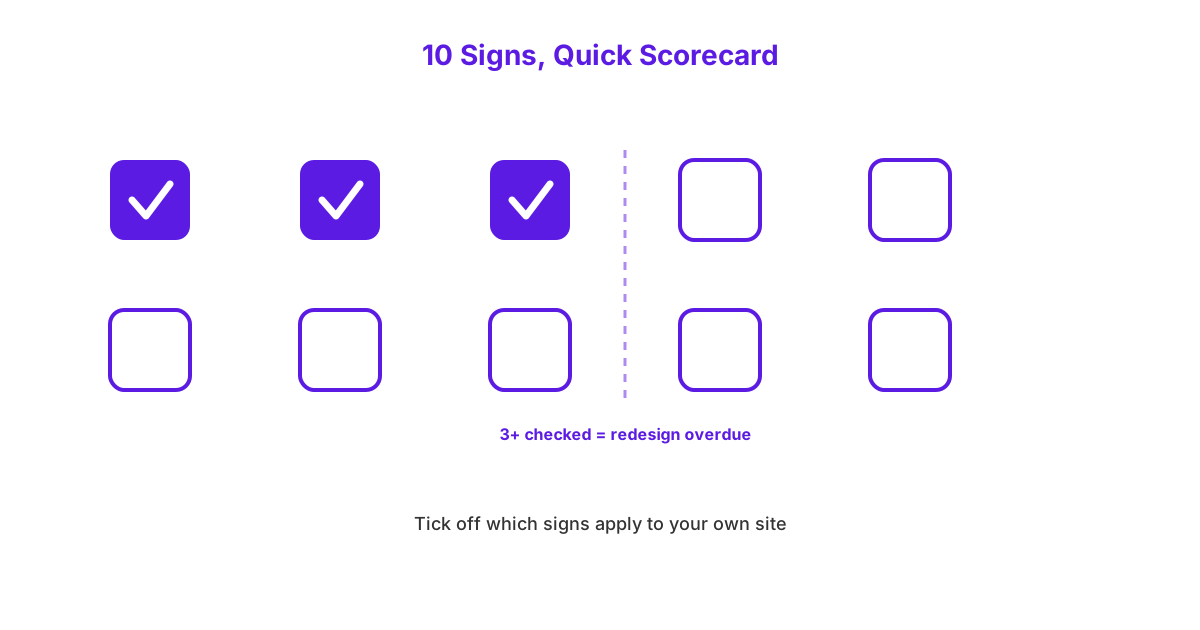
Your website needs a redesign if three or more of the 10 signs covered in this checklist currently apply to your site. These signs cluster around five core themes: outdated visual design, poor mobile experience, weak technical SEO foundations, ineffective lead generation, and difficulty updating the site yourself. A site failing on just one of these fronts might only need a targeted fix, but three or more failures together usually indicate the underlying platform itself has become the constraint, not any single isolated issue.
What Are the 10 Signs Your Website Needs a Redesign?
The 10 signs covered in this checklist span visual design, technical performance, SEO foundations, and business fit, since a website can fail its owner in any of these areas independently. Go through each one honestly against your own site rather than skimming past the ones that feel uncomfortable, since the accurate count is what makes the quick answer above actually useful.
Does Your Website Still Look Outdated?
Your website looks outdated if it uses design patterns common five or more years ago, such as small non-responsive layouts, cluttered navigation menus, or stock photography that feels generic and dated. Visual design signals trust before a single word of your content gets read, and a site that looks stuck in an earlier era of the web quietly undermines the credibility of an otherwise solid business. Modern design standards favour clean layouts, generous white space, and a small number of clear, deliberate calls to action rather than dense pages trying to say everything at once.
Comparing your site directly against two or three competitors’ websites is a fast, honest way to check this. If your competitors’ sites feel noticeably more current and yours feels dated by comparison, visitors are almost certainly making the same comparison, often within the first few seconds of arriving.
Is Your Website Not Mobile-Friendly?
Your website is not mobile-friendly if it requires pinching, zooming, or horizontal scrolling to read comfortably on a phone screen. Mobile traffic now accounts for the majority of website visits for most small Irish businesses, commonly 60% or more, meaning a poor mobile experience is failing the majority of your visitors, not a small minority. A site that looks fine on a desktop monitor but breaks down on mobile is effectively broken for most of the people actually trying to use it.
The bounce impact here is significant and measurable: visitors on mobile devices who encounter a difficult-to-use layout typically leave within seconds rather than persisting to find what they need. If you haven’t personally tried navigating your own website on your phone in the last few months, that’s worth doing today, since this is one of the fastest signs to check and one of the most damaging when it fails.
Is Your Website Slow to Load?
Your website is slow to load if it takes longer than 3 seconds to become usable on a typical mobile connection, with anything over 4 seconds representing a serious problem. Bounce rates climb sharply as load time increases: a page loading in 1 second has a meaningfully lower bounce rate than one taking 3 seconds, and that gap widens further beyond 4 seconds. This correlation holds regardless of how good your actual content or product is, since a slow page often loses the visitor before they ever see what you have to offer.
Free tools like Google PageSpeed Insights will give you an exact load time and specific technical reasons for any slowness within a couple of minutes, requiring no technical background to run. A business whose current load time falls in the 4 to 6 second range is very likely losing a meaningful share of visitors before the page even finishes rendering.
Does Your Website Fail Core Web Vitals?
Your website fails Core Web Vitals if Google’s specific measurements of loading speed, interactivity, and visual stability fall outside the ranges Google considers acceptable for a good user experience. Core Web Vitals are three specific technical measurements Google uses to judge whether a page provides a smooth experience: how quickly the main content appears, how quickly the page responds to a click or tap, and how much the layout shifts around unexpectedly while loading. These aren’t abstract technical metrics; they directly correlate with real visitor frustration, such as accidentally tapping the wrong button because the page shifted at the last second.
Failing Core Web Vitals doesn’t just frustrate visitors, it also has a direct, if modest, negative impact on search rankings, since Google explicitly factors these measurements into how it ranks pages. A site that fails these checks is fighting an uphill battle in search results even before considering content quality or backlinks.
Is Your Website Missing an SSL Certificate?
Your website is missing an SSL certificate if visitors see a “Not Secure” warning in their browser’s address bar when they arrive on your site. This warning appears specifically because the connection between your website and the visitor’s browser isn’t encrypted, which modern browsers now flag prominently rather than silently allowing. A visitor seeing this warning on a business website, particularly one asking for any personal information through a contact form, reasonably questions whether the business is legitimate or technically competent.
Beyond the trust damage, Google has explicitly confirmed that having a valid SSL certificate has been a ranking factor for several years, meaning a missing certificate creates a double cost: damaged visitor trust and reduced search visibility simultaneously. This is one of the cheapest and fastest fixes on this entire list, which makes it particularly frustrating to still find on business websites in 2026.
Is Your Website Missing Schema Markup?
Your website is missing schema markup if it has no structured, machine-readable data telling search engines and AI systems specific facts about your business, such as your services, opening hours, or review ratings. Schema markup is a behind-the-scenes layer of code that labels key facts on your page explicitly, rather than requiring Google or an AI system to infer that information from ordinary text. Its absence doesn’t break your website visually, but it quietly reduces your visibility in the specific search features, like rich results and AI-generated answers, that increasingly depend on this structured data.
This gap matters more now than it did even two years ago, since AI systems like ChatGPT and Google’s AI Overviews are increasingly citing businesses whose facts are clearly, explicitly labelled through schema rather than buried in prose alone. If your current site lacks this entirely, it’s a strong signal that the underlying build wasn’t approached with modern SEO in mind, and it’s worth looking at our web design service as a website built with SEO in mind from the outset, rather than retrofitted afterward.
Is Your Website Failing to Generate Leads or Enquiries?
Your website is failing to generate leads if it receives reasonable traffic but produces very few contact form submissions, calls, or enquiries relative to that traffic volume. A weak or hard-to-find contact form, unclear calls to action, or a confusing path from homepage to enquiry are the most common reasons a site sees traffic without converting it into actual business. This is arguably the most important sign on this entire list, since a website’s core job for most small businesses is generating leads, not simply existing online.
A conservative, well-designed small business site should convert somewhere between 2% and 5% of its visitors into a lead or enquiry, depending on the industry and how much buying intent typically exists before a visitor even arrives. If your site falls meaningfully below this range despite reasonable traffic, the problem usually sits with unclear calls to action, a buried or broken contact form, or a confusing user journey rather than with your traffic volume itself.
Can You Not Update Your Own Website?
You cannot update your own website if making a simple change, such as updating a price, adding a new team member, or fixing a typo, requires contacting a developer and waiting days for a response. This is a common and costly limitation of websites built on outdated or overly custom platforms without a proper content management system in place. The ongoing cost here isn’t just the developer’s hourly fee for small changes; it’s the accumulated cost of outdated information sitting live on your site for days or weeks at a time because updating it isn’t straightforward.
A modern CMS-based website should let a non-technical business owner make basic text and image changes themselves within minutes, without touching any code or needing developer involvement for routine updates. If every small change currently means an email to a developer and an invoice, that dependency is itself a strong sign the underlying platform needs replacing.
Has Your Business Changed More Than Your Website Has?
Your business has changed more than your website has if your site still describes services you no longer offer, uses branding you’ve since updated, or fails to reflect a shift in your actual target market or positioning. A website is meant to be an accurate, current reflection of the business behind it, and a growing gap between the two quietly confuses potential customers who arrive expecting one thing and find another. This mismatch often accumulates gradually, a service added here, a rebrand there, until the website reflects an earlier version of the business that no longer exists.
This sign is easy to miss because business owners are often too close to their own site to notice the drift, having stopped really looking at it as a fresh visitor would. Asking a friend or new employee to review your website with fresh eyes, specifically checking whether it accurately represents what you do today, is a quick, free way to catch this gap.
Is Your Website Missing Google Business Profile Integration or Analytics?
Your website is missing important integrations if it has no connection to your Google Business Profile and no analytics tracking installed, leaving you unable to measure how the site actually performs. Without analytics like Google Analytics installed, you have no visibility into how many visitors arrive, which pages they view, or where they drop off before converting, meaning every decision about the site is a guess rather than a data-informed choice. This is a particularly damaging gap because it’s invisible day to day: a business can operate for years without noticing that it’s been flying blind on its own website’s performance the entire time.
Missing Google Business Profile integration compounds this problem, since a properly connected setup reinforces consistency between your website and your local search presence, which matters significantly for local SEO visibility. Businesses considering a redesign should treat analytics and GBP integration as a non-negotiable baseline requirement, and looking at small business website packages that include this from day one avoids repeating the same blind spot with a brand new site.
What Is an Outdated Website Actually Costing Your Business?
An outdated website costs a small business real, measurable money every month through higher bounce rates, lower conversion rates, and weaker search rankings, even though this cost rarely appears as a single visible line item. Because these losses are spread across many small missed opportunities rather than one obvious event, they’re easy to underestimate until you actually add up the numbers.
The Real Impact on Bounce Rate, Conversions, and Rankings
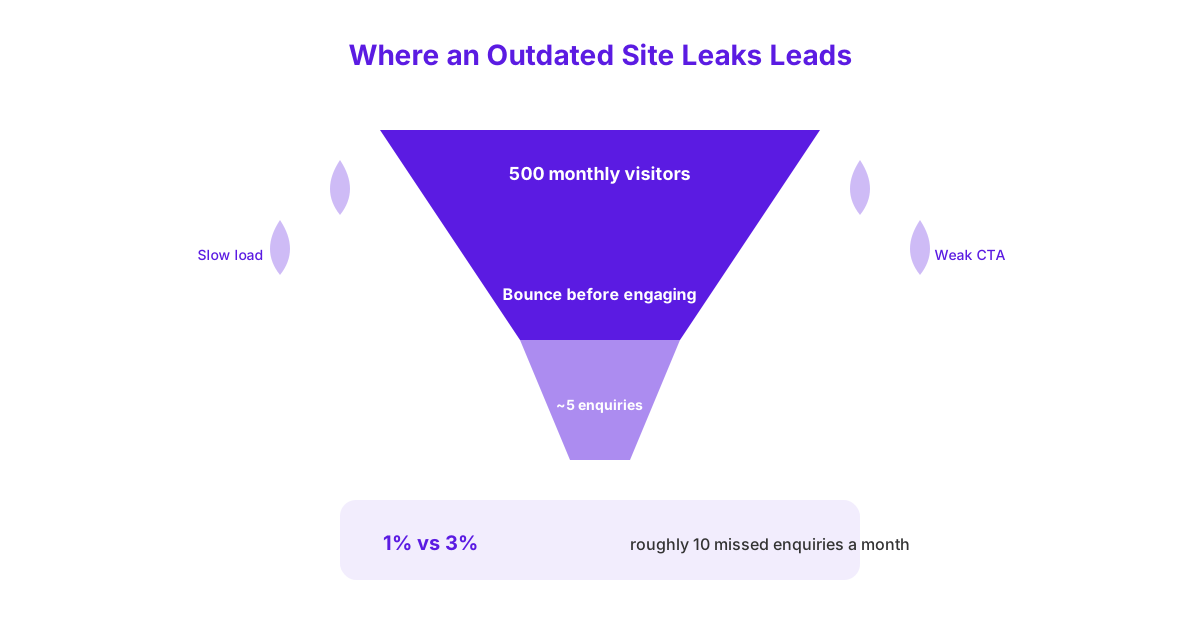
A slow, dated, or poorly structured website typically sees mobile bounce rates 20 to 30% higher than a modern, fast-loading equivalent, meaning a meaningfully larger share of visitors leave without ever engaging with your content. This elevated bounce rate directly reduces conversions: a site converting at 1% instead of a reasonable 3% baseline is effectively losing two out of every three potential enquiries it should be capturing from the same traffic. Independent research, such as Google’s own page speed studies, consistently shows that bounce rates climb sharply once load time passes a few seconds, reinforcing that this isn’t a minor, cosmetic issue but a direct driver of lost business.
Weak technical SEO foundations, such as missing schema, poor Core Web Vitals scores, or a missing SSL certificate, commonly cost a business one to three ranking positions in competitive searches, which can be the difference between appearing on page one or falling to page two entirely. For a business receiving 500 monthly website visitors converting at a conservative 1% instead of 3%, that gap represents roughly 10 missed enquiries every month, a figure that compounds significantly over a full year of lost opportunity.
How Do You Redesign Your Website Without Losing Your Existing SEO?
You redesign your website without losing existing SEO by carefully preserving your URL structure, redirecting every old page correctly, and monitoring performance closely in the weeks after launch. A redesign done carelessly can genuinely tank rankings built up over years, but a redesign done with this process in mind protects that existing value while still delivering a modern, functional site.
A Step-by-Step Process to Protect Your Rankings
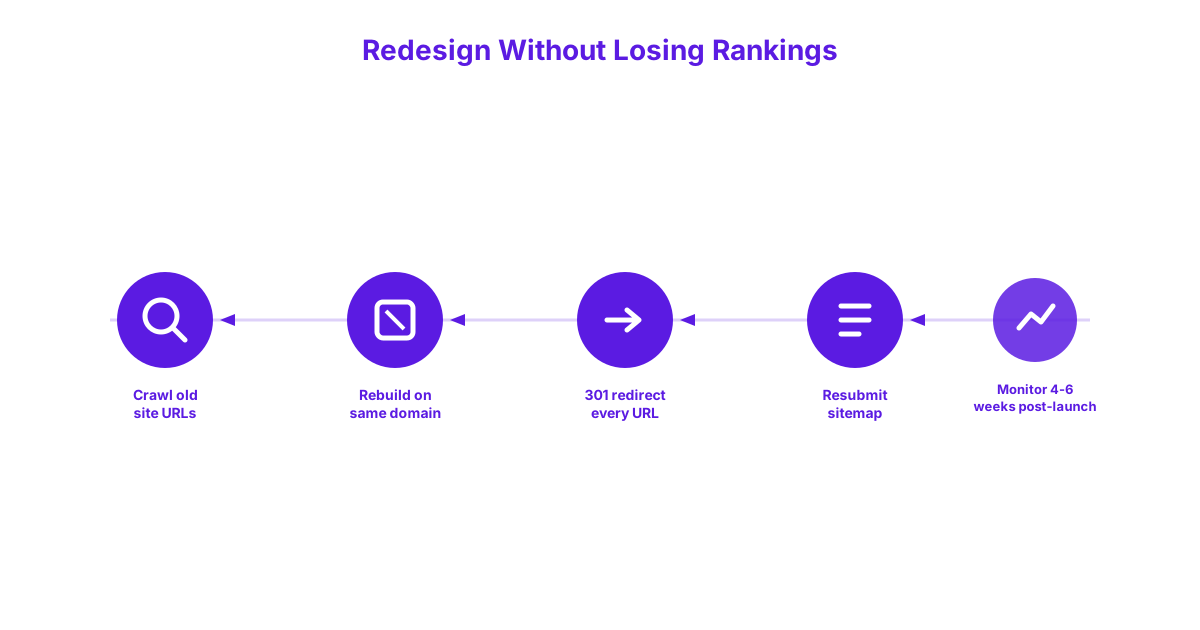
Start by crawling the existing site to create a complete list of every current URL, since you cannot properly redirect pages you don’t know exist. Rebuild the new site on the same domain wherever possible, since moving to an entirely new domain during a redesign introduces significant additional risk that’s rarely necessary. Once the new site is ready, set up a 301 redirect from every single old URL to its corresponding new URL, since missing even a handful of redirects sends both visitors and search engines to broken dead ends.
Preserve the exact meta titles and descriptions of any pages that are already ranking well for valuable search terms, since a redesign is an opportunity to improve weak pages, not to rewrite ones that are already working. Resubmit your XML sitemap to Google Search Console immediately after launch, so Google is prompted to recrawl and reindex the new site structure as quickly as possible. Finally, monitor Search Console closely for the first four to six weeks after launch, watching specifically for a spike in crawl errors or a sudden drop in impressions, since catching an issue in week one is far easier to fix than discovering it in month three.
Should You Redesign or Fully Rebuild Your Website?
You should choose a redesign, meaning a refresh within your existing CMS and platform, if your current technical foundation is sound and the issues are mainly visual or structural. You should choose a full rebuild, meaning a migration to an entirely new platform, if your current site runs on outdated or unsupported software, has severe technical limitations baked into its core structure, or was built on a platform no longer receiving security updates. The distinction matters because a rebuild carries meaningfully more risk and cost than a redesign, and choosing the wrong scope wastes both budget and time.
A quick way to tell which situation you’re in: if your web developer can make the changes you want within your current CMS without hitting fundamental platform limitations, a redesign is sufficient. If achieving what you need would require workarounds, plugins stacked on top of other plugins, or your developer says the current platform simply can’t support what you’re asking for, that’s a clear signal a full rebuild is the more honest, longer-term solution.
Website Redesign Signs at a Glance
The table below condenses all 10 signs into a single scannable checklist you can quickly compare your own website against.
| Sign | What It Signals | Why It Matters |
|---|---|---|
| Outdated Visual Design | Site uses design patterns from 5+ years ago | Undermines trust before content is even read |
| Not Mobile-Friendly | Requires zooming or scrolling to use | Fails the majority of your actual traffic |
| Slow Load Time | Takes longer than 3 to 4 seconds to load | Sharply increases bounce rate |
| Fails Core Web Vitals | Poor loading, interactivity, or stability scores | Directly impacts search rankings |
| Missing SSL Certificate | Browser shows a “Not Secure” warning | Damages trust and rankings simultaneously |
| Missing Schema Markup | No structured data for search and AI systems | Reduces visibility in rich results and AI answers |
| Failing to Generate Leads | Traffic exists but enquiries don’t follow | Site isn’t doing its core job |
| Can’t Update It Yourself | Small changes require a developer | Adds ongoing cost and delay |
| Business Has Outgrown It | Site describes an earlier version of the business | Confuses potential customers |
| Missing Analytics or GBP Integration | No way to measure performance | Every decision becomes a guess |
Frequently Asked Questions
How often should a small business redesign its website? Most small businesses should redesign their website every three to five years, though this depends heavily on how quickly the underlying platform and design standards move during that period. A site showing three or more of the signs in this checklist warrants consideration regardless of exactly how long it’s been since the last redesign.
Will a website redesign hurt my current Google rankings? A website redesign can hurt your current Google rankings if done carelessly, but following a proper process, preserving your URL structure, redirecting every old page, and monitoring Search Console closely after launch, protects your existing rankings through the transition. Most ranking losses during a redesign come from missed redirects or lost content, not from the redesign itself.
How much does a website redesign cost in Ireland? A professional website redesign in Ireland typically costs between 1,200 and 4,000 for a small business site, depending on page count, functionality, and how much custom design and content work is involved. The exact figure depends heavily on scope, and a proper quote should break down exactly what’s included rather than presenting a single vague number.
How do I know if my website needs a redesign or just minor updates? Your website likely needs only minor updates if just one or two signs from this checklist apply, while three or more signs typically indicate the underlying platform itself is the constraint. A single issue, such as an expired SSL certificate, is usually a quick fix rather than justification for a full redesign on its own.
Should a website redesign include SEO improvements? Yes, a website redesign should always include SEO improvements, since rebuilding a site without addressing schema markup, page speed, and technical foundations wastes the opportunity a redesign specifically provides to fix these issues properly. A redesign that only changes visual design while leaving the same underlying technical weaknesses in place solves half the problem at best.
Recognising these signs is the easy part. Acting on them without losing the rankings and traffic you’ve already built is where a proper process actually matters. If three or more of these signs sound familiar, book a free website review with Magnitu Digital and we’ll tell you honestly whether you need a redesign or just a targeted fix.
