Google Ads for Small Businesses: A Beginner’s Guide
Most small business owners in Ireland have heard they should be running Google Ads, usually from a competitor, an advisor, or a friend, without actually understanding how it works or where to even begin. This guide is a genuinely beginner-friendly walkthrough: what Google Ads actually is, the campaign types that matter for a small business, and exactly how to launch your first campaign, written specifically with the Irish market in mind rather than generic global advice.
What Is Google Ads and How Does It Work?
Google Ads is a pay-per-click advertising platform where businesses bid to show ads across Google Search, YouTube, and a network of partner websites, paying only when someone actually clicks the ad. Unlike traditional advertising, where you pay a fixed amount regardless of results, you’re charged specifically for each click your ad receives, meaning your spend is directly tied to actual interest rather than simple visibility. This is what “PPC,” short for pay-per-click, refers to throughout this guide and across the wider industry.
When someone searches for something relevant to your business, Google runs an instant auction among all the businesses bidding on that search term, deciding which ads to show and in what order. This decision isn’t based purely on who bids the most money. Google combines your bid with something called Quality Score, a rating based on how relevant your ad and landing page are to the search term, meaning a highly relevant, well-targeted ad can outrank a competitor bidding more money but offering a poorer match to what the searcher is actually looking for. This is genuinely good news for small businesses in Ireland, since a well-crafted, locally relevant campaign can compete effectively against larger competitors with bigger budgets but less precisely targeted ads.
Why Should a Small Business in Ireland Consider Google Ads?
A small business in Ireland should consider Google Ads because it offers immediate visibility, precise geographic and demographic targeting, and complete control over how much you spend. Unlike SEO, which typically takes months to show meaningful results, a Google Ads campaign can start generating clicks and enquiries within hours of going live, which matters enormously for a business needing leads now rather than eventually.
Geographic targeting is particularly valuable for Irish businesses, since Google Ads lets you target as precisely as a specific county, city, or even a radius around your business address, rather than paying to show ads to people who could never realistically become customers. A plumber in Tuam can target only County Galway and its immediate surrounding areas, avoiding wasted spend on clicks from Dublin or Cork that would never convert into a genuine local job. This level of precision, combined with full control over your daily and monthly budget, means a small business with even a modest advertising budget can run a genuinely effective, tightly targeted campaign without competing head-on with national or international advertisers for the same broad reach.
What Types of Google Ads Campaigns Should a Small Business Know About?
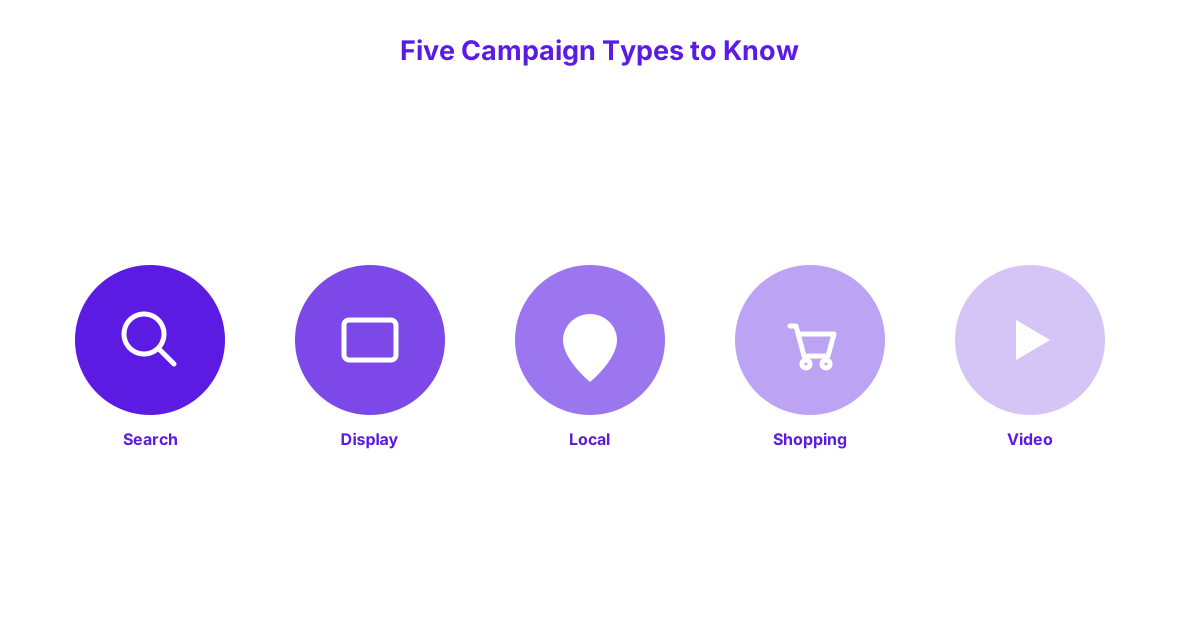
A small business should know about five core Google Ads campaign types: Search, Display, Local, Shopping, and Video, each serving a different purpose and suited to different business needs. Understanding what each one actually does helps you choose the right starting point rather than guessing based on the name alone.
Search Ads
Search ads are text-based ads that appear directly within Google’s search results when someone types in a relevant search term, making them the most common and often the best starting point for a small business new to Google Ads. These ads appear above or alongside the regular, unpaid search results, marked with a small “Sponsored” label, and are triggered specifically by the keywords you choose to target. A Galway-based accountant running search ads for “tax return help Galway” appears directly in front of someone actively searching for exactly that service, at the precise moment they’re looking for it.
Search ads work particularly well because they capture existing demand rather than trying to create it, reaching people who have already decided they need a service like yours and are actively searching for it right now.
Display Ads
Display ads are visual, image-based ads that appear across a vast network of partner websites, apps, and Gmail, rather than within Google’s own search results directly. These ads work well for building broader brand awareness and staying visible to people who aren’t actively searching at that exact moment but might remember your business later. A Galway retail shop might use display ads to show a product image to someone who previously visited their website but didn’t make a purchase, gently reminding them to return.
Display ads generally produce a lower direct conversion rate than search ads, since they reach people at an earlier, less committed stage of interest, making them better suited to awareness and retargeting goals than immediate lead generation.
Local Campaigns
Local campaigns are a specific Google Ads format designed to drive foot traffic to a physical business location, showing ads across Google Search, Maps, and YouTube simultaneously with a single simplified setup. This format works particularly well for Irish businesses with a genuine physical premises, such as a café, retail shop, or clinic, where the primary goal is getting someone to actually walk through the door rather than simply visit a website. A restaurant in Salthill running a local campaign might appear when someone searches for restaurants nearby on Google Maps, directly driving in-person visits.
Local campaigns require less manual keyword management than search ads, since Google’s system automatically optimises for the specific goal of driving in-store visits and calls based on the business information you provide.
Shopping Ads
Shopping ads display a product image, price, and business name directly within Google’s search results, specifically designed for businesses selling physical products online. These ads pull directly from a product feed you set up through Google Merchant Center, rather than being written manually like search ad text, meaning the setup process differs somewhat from other campaign types. An Irish craft business selling handmade goods online can use shopping ads to show their actual product photo and price directly in relevant search results, letting a potential customer compare options visually before ever clicking through.
Shopping ads work particularly well for e-commerce businesses with a genuine product catalogue, since the visual, price-forward format directly addresses what an online shopper is usually comparing at that stage of their search.
Video Ads
Video ads run on YouTube and across Google’s video partner network, typically as a short video shown before, during, or alongside other video content. These work well for businesses wanting to build brand storytelling or demonstrate a product or service in action, rather than driving an immediate, direct response. A Galway tourism business might use a short video ad showcasing the local area to build interest among people researching an upcoming trip to the region.
Video ads generally require more upfront production effort than other formats, since they need an actual video asset rather than text or a static image, making this format a less common starting point for a small business just beginning with Google Ads.
How Do You Choose the Right Keywords for a Google Ads Campaign?
You choose the right keywords for a Google Ads campaign by selecting search terms genuinely relevant to what your business offers, then controlling exactly how broadly or narrowly each keyword matches related searches. Getting this step right matters enormously, since keywords determine exactly which searches trigger your ad in the first place.
Broad Match, Phrase Match, and Exact Match Explained
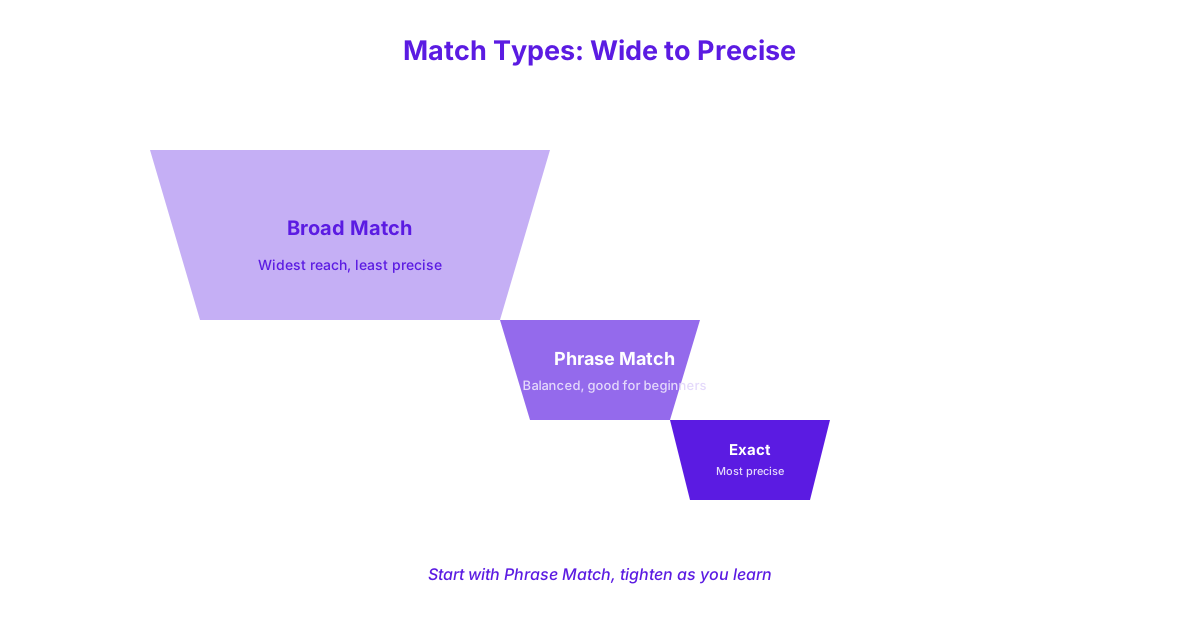
Broad match, phrase match, and exact match are three different settings controlling how closely a person’s actual search needs to match your chosen keyword before your ad is shown. Broad match is the least restrictive option, showing your ad for a wide range of related searches, even ones that don’t contain your exact keyword, which can drive volume quickly but also risks matching irrelevant searches if not monitored carefully. Phrase match sits in the middle, showing your ad for searches that include your keyword phrase in the same order, allowing some additional words before or after, giving a reasonable balance between reach and relevance.
Exact match is the most restrictive setting, showing your ad only for searches very closely matching your exact keyword phrase, producing the smallest but most tightly relevant audience. A Tuam-based electrician might use exact match on “electrician Tuam” to capture only the most precisely relevant searches, while using phrase match on “emergency electrician” to capture a wider but still genuinely relevant set of related searches. Beginners are generally best served starting with phrase match, since it offers a reasonable balance between reach and relevance without the unpredictability broad match can introduce early on.
Using Negative Keywords to Avoid Wasted Spend
Negative keywords are specific terms you deliberately exclude your ads from showing for, preventing your budget from being spent on clicks from searches that will never convert into a genuine customer. A business offering paid services should typically add “free” as a negative keyword, since someone searching for a free version of your service is very unlikely to become a paying customer regardless of how well-targeted your ad otherwise is. Similarly, a business not currently hiring should add “jobs” or “careers” as negative keywords, since job seekers searching your business name aren’t potential customers.
Reviewing your search terms report regularly and adding new negative keywords as you spot irrelevant searches triggering your ads is one of the single highest-value habits a beginner can build early on. If managing this ongoing refinement feels like more than you want to take on yourself, our Google Ads management service handles exactly this kind of continuous keyword and negative keyword management on a business’s behalf.
How Do You Set Up Your First Google Ads Campaign?
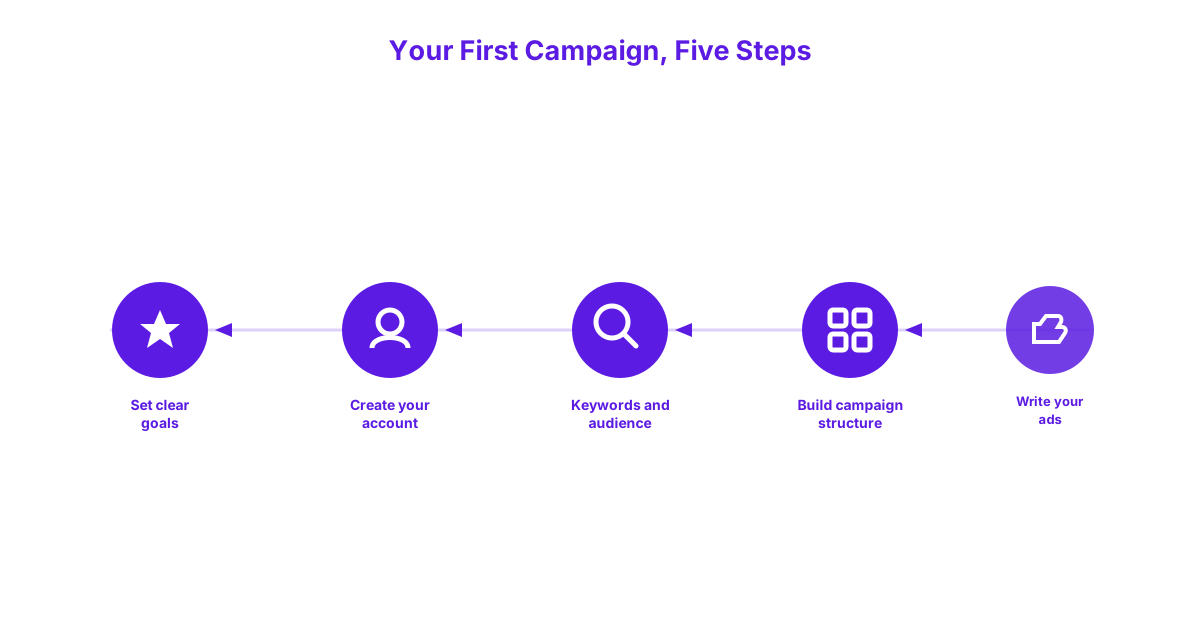
You set up your first Google Ads campaign by setting clear goals, creating your account, defining your audience and keywords, building your campaign structure, and writing your ads. Following this sequence in order prevents the common beginner mistake of jumping straight to writing ads before the underlying strategy is actually in place.
A Step-by-Step Walkthrough
Start by setting a clear, specific goal for your campaign, such as generating phone enquiries, website contact form submissions, or in-store visits, since this goal shapes almost every subsequent setup decision, including which campaign type and conversion tracking setup you’ll need. Next, create your Google Ads account at ads.google.com, which requires a Google account and basic business information, including your website and billing details, to get started. With your account created, define your audience and keywords, specifying the Irish counties, cities, or radius you want to target, alongside the specific search terms relevant to your business using the match types described above.
Build your first campaign structure by grouping related keywords into tightly themed ad groups, such as separating “boiler repair” keywords from “boiler installation” keywords into their own distinct groups, since this allows more relevant, specific ad copy for each group rather than one generic ad trying to cover everything. Finally, write your ads for each ad group, following the good ad copy principles covered in the next section, and set your daily budget, which you can adjust at any time as you learn what’s working. Reviewing your setup once more before going live, particularly your location targeting and negative keywords, catches the most common beginner mistakes before they start costing you money.
What Does a Good Google Ad Actually Look Like?
A good Google Ad directly matches the searcher’s intent, clearly states what you offer, and includes a specific, relevant call to action rather than vague or generic language. The difference between an effective ad and a weak one often comes down to specificity rather than clever wording.
A Worked Example of Effective Ad Copy
A worked example of effective ad copy for a Galway plumbing business might use the headline “Emergency Plumber Galway, Available 24/7” paired with the description “Fast, local response across Galway city and county. Call now for a free quote, no call-out fee.” This works because the headline immediately confirms both the service and the location match what the searcher typed, while also addressing the urgency implied by an “emergency” search. The description adds specific, concrete details, availability, geographic coverage, and a clear, low-friction next step, rather than vague claims like “quality service you can trust,” which say nothing a searcher can actually act on.
A weaker version of the same ad, such as “Plumbing Services, Contact Us Today,” fails specifically because it doesn’t confirm location relevance, doesn’t address urgency, and offers no specific reason to choose this business over any other plumbing ad appearing alongside it. The strength of good ad copy lies in this kind of concrete specificity, not creativity for its own sake.
How Much Should You Expect to Spend as a Beginner?
Most small businesses in Ireland should expect to start with a modest testing budget of roughly 300 to 500 euro per month when first trying Google Ads, treating this as a genuine testing phase rather than a full growth strategy. This starting figure gives you enough data to see whether Google Ads can generate relevant enquiries for your specific business at all, without committing a large budget before you’ve validated that the channel works for you.
This is deliberately a brief, general starting point rather than a full calculation, since working out the right ongoing budget for your specific business, industry, and goals deserves a more thorough breakdown than fits within a beginner’s setup guide. For the complete picture, including industry-specific cost expectations and how to calculate a budget based on your own customer value and close rate, our full guide to Google Ads budgets in Ireland walks through this in detail.
What Mistakes Do Small Businesses Commonly Make With Google Ads?
The most common mistakes small businesses make with Google Ads are targeting too broadly, ignoring negative keywords, sending all traffic to a generic homepage, and setting campaigns to run on autopilot without ongoing attention. Each of these mistakes quietly wastes budget without necessarily being obvious until you know specifically what to look for.
Targeting Too Broadly and Ignoring Negative Keywords
Targeting too broadly, such as running a campaign across all of Ireland when a business only genuinely serves one county, wastes budget on clicks from people who could never realistically become customers regardless of how relevant your ad copy is. This mistake is particularly common among beginners who default to the widest possible targeting out of a mistaken belief that more reach automatically means more business. Ignoring negative keywords compounds this problem, allowing irrelevant searches to keep consuming budget month after month simply because no one reviewed the search terms report and excluded them.
Both mistakes share the same underlying cause: treating campaign setup as a one-time task rather than something requiring regular review and refinement, particularly in the first few months while a campaign’s actual performance patterns are still becoming clear.
Sending All Traffic to the Homepage and Setting Campaigns to Autopilot
Sending all ad traffic to a generic homepage, rather than a page specifically relevant to what the ad promised, significantly reduces conversion rates, since a visitor expecting information about emergency plumbing shouldn’t have to search through a general homepage to find it. Google’s own guidance on Quality Score confirms that landing page relevance directly affects both ad rank and cost per click, not just conversion rate, meaning this mistake actively costs more per click in addition to converting worse. A dedicated landing page matching each ad’s specific offer and language consistently outperforms a generic homepage sending every visitor to the same starting point regardless of what brought them there.
Setting campaigns to autopilot, meaning launching a campaign and never reviewing performance data afterward, is the final common mistake, since Google Ads rewards active, ongoing refinement based on real performance data far more than a “set and forget” approach. A beginner checking their campaign’s performance weekly for the first two months, adjusting keywords, ad copy, and targeting based on what the data actually shows, will consistently outperform one who launches a campaign and simply lets it run untouched.
How Do You Know If Your Google Ads Campaign Is Working?
You know if your Google Ads campaign is working by tracking click-through rate, conversion rate, and cost per conversion, rather than focusing on impressions or raw click counts alone. Impressions and clicks show that people are seeing and engaging with your ad, but they say nothing about whether that engagement is actually translating into real business, which is ultimately what matters.
Click-through rate, meaning the percentage of people who see your ad and actually click it, indicates whether your ad copy is genuinely resonating with the audience seeing it. Conversion rate, meaning the percentage of those clicks that result in an actual enquiry, call, or purchase, shows whether your landing page and offer are effectively converting that initial interest into real business. Cost per conversion, calculated by dividing your total spend by the number of actual conversions generated, is the metric that most directly answers whether your campaign is a genuinely worthwhile investment. Setting up basic conversion tracking from day one, connecting form submissions or phone calls back to your Google Ads account, is essential for measuring any of this accurately, since without it, you’re left guessing whether your campaign is actually working at all.
Google Ads for Small Businesses at a Glance
The table below condenses the five campaign types covered in this guide into a single scannable reference.
| Campaign Type | Best For | Typical Use Case |
|---|---|---|
| Search Ads | Capturing active search demand | A service business appearing for “plumber Galway” |
| Display Ads | Brand awareness and retargeting | Reminding past website visitors about a product |
| Local Campaigns | Driving in-person visits | A café or retail shop appearing on Google Maps |
| Shopping Ads | Selling physical products online | An e-commerce store showing product and price |
| Video Ads | Storytelling and demonstration | A tourism business showcasing the local area |
Frequently Asked Questions
How much should a small business spend on Google Ads to start?
Most small businesses in Ireland should start with a testing budget of roughly 300 to 500 euro per month, treating this as a genuine trial period rather than a full growth strategy. This gives enough data to validate whether Google Ads generates relevant enquiries for your specific business before committing a larger, ongoing budget.
How long does it take to see results from Google Ads?
Google Ads can generate clicks and enquiries within hours of a campaign going live, though performance typically takes 60 to 90 days to stabilise as Google’s system gathers enough data to optimise delivery effectively. The first few weeks often show a higher cost per lead than the campaign will eventually settle into once this initial learning period completes.
Should I manage my own Google Ads or hire someone?
Whether to manage your own Google Ads or hire someone depends mainly on your available time and comfort learning the platform, since a small testing budget can reasonably be self-managed while larger or more competitive campaigns often benefit from professional management. A business with genuine time to learn and monitor a campaign weekly can reasonably start self-managed, then reassess once budget or complexity grows.
How many keywords should I target when starting out?
Most beginners should start with 10 to 20 tightly relevant keywords grouped into a small number of specific ad groups, rather than a broad, unfocused list of dozens of loosely related terms. This keeps campaign management manageable and allows more specific, relevant ad copy for each distinct group of keywords.
Can I target only my local area in Ireland with Google Ads?
Yes, Google Ads allows targeting as precisely as a specific county, city, or a radius around a business address anywhere in Ireland, rather than requiring national or international reach. This is particularly valuable for local service businesses wanting to avoid wasting budget on clicks from areas they could never realistically serve.
Getting started with Google Ads is far less intimidating once you understand the core mechanics and avoid the most common early mistakes covered in this guide. If you’d like help setting up and managing your first campaign properly from day one, get in touch and talk to us about getting started.
