Content Repurposing: How to Turn One Blog Post Into Ten Pieces of Content
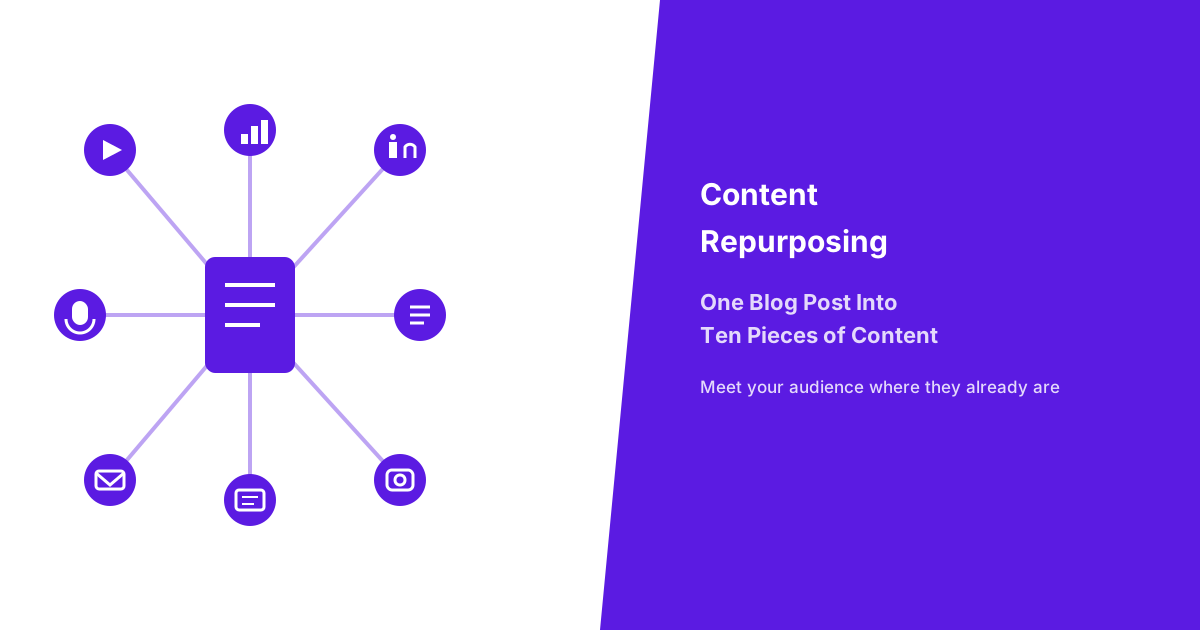
Content repurposing isn’t about funnelling every format back to your website, hoping to drive traffic to a single destination. It’s about meeting your audience where they already spend their time, whether that’s scrolling Instagram, listening to a podcast during a commute, or skimming LinkedIn between meetings. This guide gives you a simple 3-phase framework, a format-by-format breakdown with realistic effort levels for each, and a way to decide which posts are actually worth the repurposing effort in the first place.
What Is Content Repurposing, and Why Does It Work?
Content repurposing is the practice of adapting one piece of content into multiple formats for different platforms and audience preferences, rather than creating something entirely new from scratch every time. A single well-researched blog post can become a short video, a podcast segment, a handful of social posts, and an email sequence, each reaching people who wouldn’t have encountered the original written piece at all. This isn’t duplication for its own sake, it’s translation into the specific format each audience segment actually prefers to consume.
It works for two straightforward reasons. First, different audiences genuinely prefer different formats, meaning a person who’d never read a 2,000-word blog post might happily watch a 90-second video covering the same core insight. Second, it multiplies the return on time already invested in the original piece, since the research, thinking, and expertise behind a strong blog post don’t need to be redone for each new format, only reshaped. Industry research on content marketing efficiency has found that businesses systematically repurposing existing content produce measurably more output per hour invested than those creating every format from scratch, reinforcing that this is a genuine efficiency gain, not just a nice-to-have habit.
How Do You Decide Which Blog Posts Are Worth Repurposing?
You decide which blog posts are worth repurposing by checking whether they’re genuinely evergreen, broadly relevant to your audience, and already high quality, since repurposing effort spent on a weak or narrow post produces weak or narrow results across every new format too. Not every post you’ve published deserves this treatment, and being selective is what makes a repurposing habit sustainable rather than overwhelming.
Choose Content That Is Evergreen, Broadly Relevant, and High Quality
Evergreen content, meaning posts whose value doesn’t expire with a specific date or a passing trend, makes the best repurposing candidate, since a video or social post built from a time-sensitive piece becomes irrelevant just as quickly as the original did. A post about “how to lower Facebook ad costs” remains useful for years, while one about “Black Friday deals for 2024” has an expiration date built into its core topic, making the first a far better repurposing investment than the second. Broadly relevant content, meaning posts addressing a genuinely common question or problem rather than a narrow edge case, reaches more people across each new format, since a wider audience already has the underlying question this content answers.
High quality is the final, non-negotiable filter: a post that was thin, poorly researched, or weakly written in its original blog form will produce equally thin, weak content in every repurposed format, since repurposing reshapes existing substance rather than creating new substance from nothing. Reviewing your published posts against these three filters, evergreen, broadly relevant, and genuinely strong, typically narrows a large blog archive down to a focused, worthwhile shortlist rather than treating every single post as equally deserving of repurposing effort.
What’s a Simple Framework for Repurposing Content?
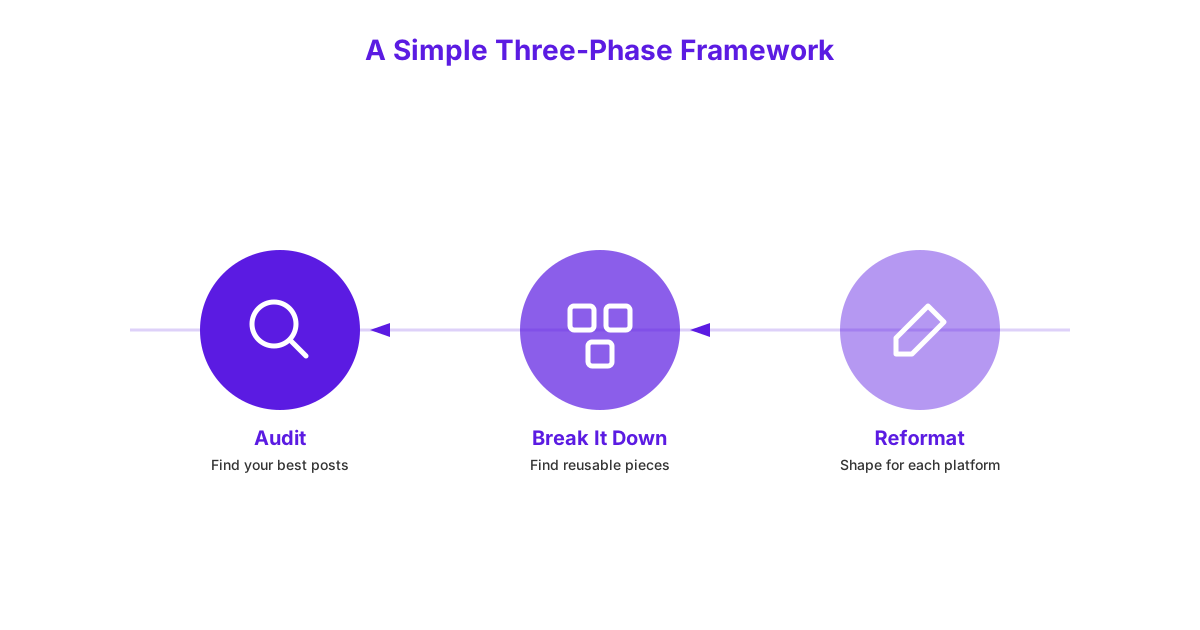
A simple framework for repurposing content follows three phases: auditing your best-performing content, breaking it into reusable pieces, and reformatting each piece for its destination platform. Working through these phases in order, rather than jumping straight to reformatting, produces considerably better results than repurposing content on an ad hoc, unplanned basis.
Phase One: Audit Your Best-Performing Content
Auditing your best-performing content means reviewing your existing analytics, organic traffic, time on page, and social shares, to identify which posts have already proven themselves valuable to real readers. A post that consistently ranks well, holds attention, or gets shared repeatedly has already demonstrated genuine audience demand, making it a considerably safer repurposing bet than guessing which topics might resonate in a new format. This audit should specifically apply the evergreen, broadly relevant, and high-quality filters covered above, narrowing your full content library down to a realistic shortlist of five to ten genuinely strong candidates to start with.
This phase requires no new content creation at all, only honest analysis of what you’ve already published, making it the fastest and lowest-risk starting point for building a repurposing habit.
Phase Two: Break It Into Reusable Pieces
Breaking a post into reusable pieces means identifying the distinct, individually valuable components within it, a strong opening hook, a key statistic, a step-by-step process, a memorable quote, rather than treating the post as a single, indivisible block. A 2,000-word guide on choosing a web design package, for example, likely contains at least five to seven genuinely standalone insights that could each anchor their own social post, video clip, or email. Identifying these pieces explicitly, rather than vaguely re-reading the post and hoping inspiration strikes during the reformatting stage, makes the next phase considerably faster and more focused.
This breakdown work is where most of the actual thinking happens, and doing it thoroughly here means the reformatting phase becomes largely mechanical execution rather than requiring fresh creative effort for each new format.
Phase Three: Reformat for Each Platform
Reformatting for each platform means adapting the specific pieces identified in phase two into the native style and length each destination platform’s audience actually expects, rather than simply copying and pasting the same text everywhere. A LinkedIn audience expects a different tone and structure than an Instagram audience, and content that ignores this mismatch underperforms regardless of how strong the underlying insight is. This phase is covered in detailed, format-by-format breakdowns throughout the rest of this guide, since the specific techniques differ meaningfully across video, podcast, social, email, and visual formats.
Which Formats Can You Actually Create From One Blog Post?
A single blog post can realistically become video content, a podcast segment, social media snippets, an email sequence, and visual assets, each requiring a different level of effort to produce well. The table below gives you a realistic sense of effort investment across these format categories before diving into the specific how-to breakdowns that follow.
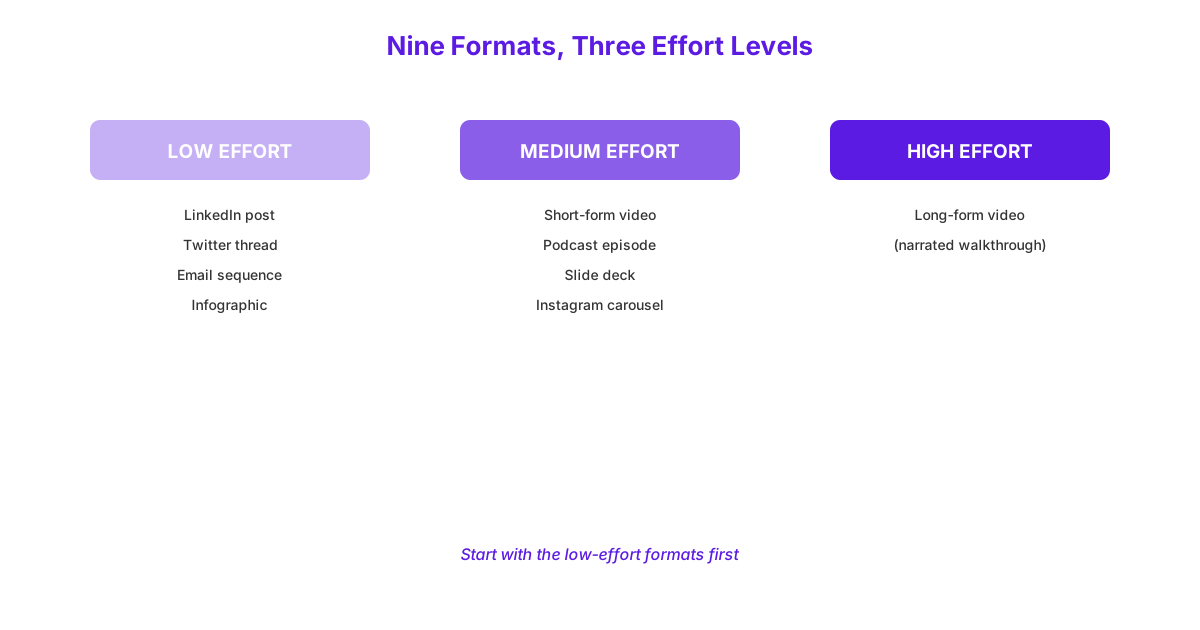
| Platform | Format | Effort Level |
|---|---|---|
| Video | Short-form clip (Reels, TikTok, Shorts) | Medium |
| Video | Long-form narrated walkthrough (YouTube) | High |
| Podcast | Talk-through episode | Medium |
| Social Media | Snippets, carousels, and threads | Low |
| Short repurposed sequence | Low | |
| Visual | Infographic or quote graphic | Low |
| Visual | Slide deck | Medium |
How Do You Turn a Blog Post Into a Video?
You turn a blog post into a video by pulling the single strongest insight from the post for a short-form clip, or by restructuring the full piece into a longer, narrated walkthrough for platforms that reward longer watch time. A short-form clip, suited to Reels, TikTok, or YouTube Shorts, works best when it isolates one specific, self-contained point, such as a single statistic or a single tip, rather than attempting to compress an entire multi-section blog post into 30 to 60 seconds.
A longer, narrated walkthrough, better suited to YouTube’s long-form format, can follow the blog post’s full structure more closely, effectively narrating the piece while adding verbal context, examples, or asides that wouldn’t fit naturally in written form. This format requires meaningfully more production effort, typically landing at a High effort level, since it involves scripting, filming, and editing a complete video rather than a single short clip. Choosing between these two video approaches depends on whether your goal is quick, broad reach through short-form content, or deeper engagement through a longer, more comprehensive piece.
How Do You Turn a Blog Post Into a Podcast Episode?
You turn a blog post into a podcast episode by reading the post’s core argument aloud as a structured talk-through rather than a flat, word-for-word recitation, adding context and examples a written piece wouldn’t naturally include. Simply reading blog text aloud produces a stilted, unengaging listening experience, since written and spoken language follow genuinely different natural rhythms and structures.
A more effective approach treats the blog post as a loose outline rather than a script, talking through each main point conversationally, adding a personal anecdote, a clarifying example, or a direct address to the listener that written prose typically omits. This format sits at a Medium effort level, since it requires recording and basic editing but doesn’t demand the same visual production work a video requires. A podcast version of a blog post also gives you room to expand on nuance or answer an implied follow-up question the original written piece didn’t have space to cover, adding genuine value beyond simply restating the same information in audio form.
How Do You Adapt a Blog Post for Social Media?
You adapt a blog post for social media by reshaping it differently for each specific platform, since LinkedIn, X/Twitter, and Instagram each reward a distinctly different format and tone. Treating all three platforms identically, posting the same generic snippet everywhere, underperforms compared to genuinely native content built for each one’s specific audience expectations.
LinkedIn: Turning a Post Into a Native Article or Carousel
Turning a blog post into LinkedIn content works best as either a native LinkedIn article, republishing an adapted, slightly shortened version directly on the platform, or as a carousel post breaking the piece’s key points into a swipeable, visual sequence. A native article suits posts with a strong professional or B2B angle, since it keeps readers within LinkedIn’s own environment rather than requiring an external click, which the platform’s algorithm tends to favour. A carousel works particularly well for step-by-step or listicle-style posts, translating a structured blog format directly into LinkedIn’s swipeable card format with minimal restructuring effort required. This adaptation sits at a Low effort level, since it largely involves reformatting existing text and headings rather than creating new content from scratch.
Businesses building a consistent presence this way benefit from treating it as part of a full content strategy rather than a one-off repurposing exercise, since a single well-adapted LinkedIn post works best when it fits into an ongoing, planned content rhythm.
X/Twitter: Turning a Post Into a Thread
Turning a blog post into an X/Twitter thread means breaking the post’s structure into a sequence of short, individually complete posts, each building on the last while still making sense as a standalone statement. A blog post’s H2 subheadings often translate directly into individual thread posts, with the opening post functioning as a hook summarising the overall value the reader will get from following the full thread. This format sits at a Low effort level, since it’s primarily a restructuring and condensing exercise rather than requiring new research or content creation.
The key discipline here is genuine condensing, not simply copying full paragraphs into oversized posts, since a thread’s effectiveness depends on each individual post being tight, scannable, and quickly digestible on its own.
Instagram: Turning a Post Into a Carousel or Reel
Turning a blog post into Instagram content works well as either a carousel, breaking key points into a swipeable visual sequence similar to LinkedIn’s format but with a more visually driven design, or as a Reel following the short-form video approach covered earlier. Instagram’s carousel format rewards clean, minimal text per slide paired with a strong visual design, meaning a direct copy-paste of blog paragraphs performs poorly compared to genuinely distilled, one-idea-per-slide content. This format sits at a Low to Medium effort level depending on how much original graphic design goes into each slide, since a text-only carousel requires considerably less effort than one with custom illustrations or branded graphics.
How Do You Turn a Blog Post Into an Email?
You turn a blog post into an email by breaking it into a short sequence of 3 to 5 separate emails, each covering one specific section or takeaway, rather than pasting the entire post into a single, long newsletter. A single email containing an entire 2,000-word blog post asks too much of a reader’s inbox attention span, and most recipients will skim past it without genuinely absorbing the content.
Breaking the same post into a sequence instead, sent over consecutive days or weeks, gives each individual point room to be read properly and gives you multiple separate opportunities to re-engage your list rather than a single, easily-ignored email. This format sits at a Low effort level, since it primarily involves selecting and lightly editing existing sections rather than writing new content, though thoughtful sequencing, deciding which point leads and which follows, does require some genuine editorial judgement. This approach also naturally produces more total email sends from the same underlying research and writing effort, extending the original post’s value across weeks rather than a single one-off send.
How Do You Turn a Blog Post Into a Visual Asset?
You turn a blog post into a visual asset through infographics, quote graphics, or slide decks, each translating written information into a format that communicates faster than reading prose and performs particularly well for visual platforms and presentations. These formats work especially well for posts containing statistics, step-by-step processes, or particularly quotable insights.
Infographics and Quote Graphics
Infographics work best for blog posts containing a clear process, a comparison, or several related statistics, translating this information into a single, visually structured image that communicates the core content at a glance rather than requiring the reader to work through full paragraphs. Quote graphics, a simpler alternative, take a single strong, standalone sentence from the post and present it as a clean, branded visual, working particularly well for Instagram or as a supporting image within social posts. Both formats sit at a Low effort level when using a simple, repeatable design template, since the main work involves populating an existing template with new text and data rather than designing from scratch each time.
Slide Decks for LinkedIn or Presentations
Slide decks work well for repurposing a blog post’s full structure into a presentation format, whether shared as a LinkedIn native document post or used as an actual presentation for a talk, webinar, or client meeting. Each major section or H2 from the original post typically becomes one or two slides, translating written paragraphs into concise bullet points and supporting visuals rather than dense blocks of text. This format sits at a Medium effort level, since building a genuinely clean, well-designed deck takes more time than a single infographic, though a reusable slide template significantly speeds up each subsequent deck built from future posts.
How Do You Systemize Repurposing So It Actually Happens?
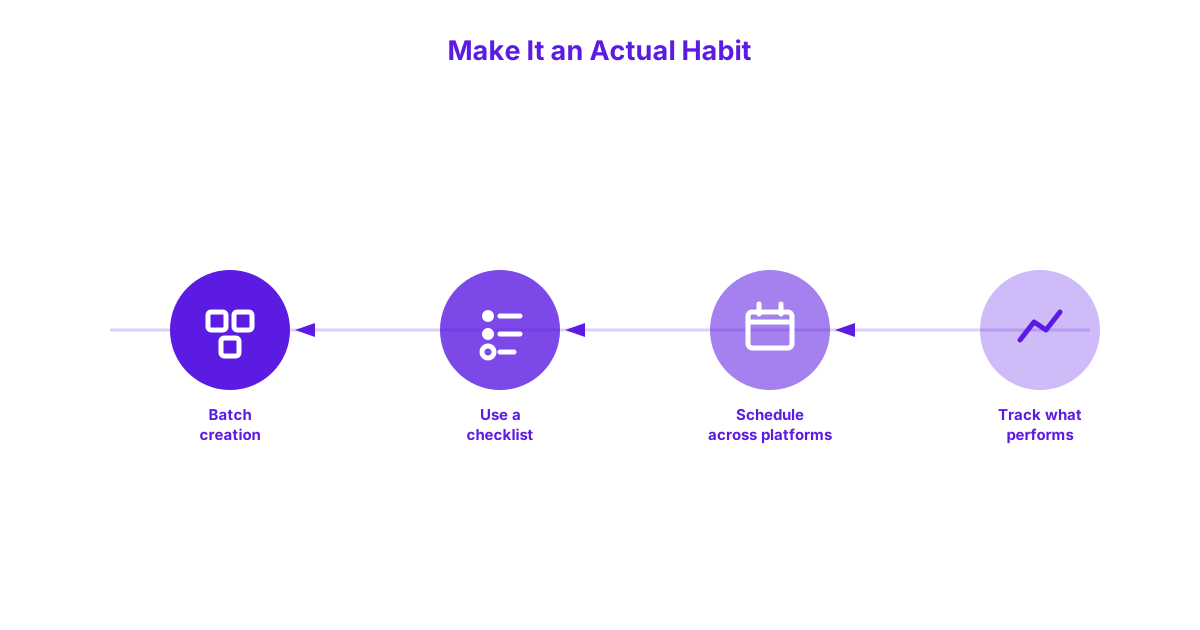
You systemize repurposing by batching creation, using a repeatable checklist, scheduling output across platforms in advance, and tracking what actually performs, turning repurposing from an occasional, easily-forgotten idea into a genuine ongoing habit. Without this kind of system, repurposing tends to happen inconsistently, if at all, even when a business genuinely recognises its value.
A Simple Repeatable Workflow
Batching creation means setting aside one focused session, perhaps a half day per month, to repurpose several posts at once rather than trying to fit this work into scattered, interrupted pockets of time between other tasks. Using a repeatable checklist, working through the same sequence of formats, video, podcast, social, email, visual, for each selected post, ensures nothing gets forgotten and makes the process faster each time it’s repeated. Scheduling the resulting content across platforms in advance, rather than publishing everything at once, spreads the value of a single repurposing session across several weeks of consistent output.
Tracking which repurposed formats actually perform best for your specific audience, then weighting future effort toward those formats, refines this system over time rather than treating every format as equally worth the ongoing effort. This entire systemization effort works best when it’s built directly into a proper content calendar, since scheduling repurposed content alongside original new content in one place prevents the two from competing for the same publishing slots.
Content Repurposing at a Glance
The table below condenses the format breakdown covered throughout this guide into a single scannable reference.
| Format | Best For | Effort Level |
|---|---|---|
| Short-Form Video | Quick, broad reach on Reels, TikTok, Shorts | Medium |
| Long-Form Video | Deeper engagement on YouTube | High |
| Podcast Episode | Audio-first audiences, commute listening | Medium |
| LinkedIn Article or Carousel | Professional and B2B audiences | Low |
| X/Twitter Thread | Quick, scannable idea breakdown | Low |
| Instagram Carousel or Reel | Visual, younger-skewing audiences | Low to Medium |
| Email Sequence | Re-engaging an existing list over time | Low |
| Infographic or Quote Graphic | Statistics, processes, quotable insights | Low |
| Slide Deck | LinkedIn documents, presentations, webinars | Medium |
Frequently Asked Questions
How often should you repurpose a blog post?
You should repurpose a strong blog post as soon as it’s proven itself through solid traffic or engagement, typically within a month or two of publishing, rather than waiting indefinitely. Older, still-relevant evergreen posts are also worth revisiting periodically, since a post repurposed once can often be repurposed again into different formats over time.
Does repurposed content hurt SEO through duplication?
No, repurposed content does not hurt SEO through duplication, since formats like video, podcasts, and social posts exist on entirely different platforms rather than competing with your original blog post’s search rankings. Search engines evaluate blog content in the context of your website specifically, and content adapted for other platforms simply doesn’t create the kind of on-site duplication that could cause a ranking conflict.
What’s the easiest format to start repurposing into?
The easiest format to start repurposing into is social media snippets, particularly a LinkedIn carousel or an X/Twitter thread, since both sit at a Low effort level and primarily involve restructuring existing text rather than creating new content types like video or audio. This makes social snippets the most realistic starting point for a business building a repurposing habit for the first time.
Should every blog post be repurposed?
No, not every blog post should be repurposed, only those that are genuinely evergreen, broadly relevant, and already high quality, since repurposing effort spent on a weak or narrow post produces equally weak results across every new format. Applying this selection filter consistently keeps repurposing sustainable rather than treating every single post as equally deserving of the additional effort.
Can AI tools help with content repurposing?
Yes, AI tools can genuinely help with content repurposing, particularly for first-draft reformatting, such as converting a blog post’s structure into a rough thread outline or a first-pass video script. Human review and editing still matter at this stage, ensuring the final repurposed content genuinely fits each platform’s tone and the business’s authentic voice rather than reading as generic or mechanically generated.
Repurposing turns one solid piece of research and writing into weeks of content across every platform your audience actually uses, without needing to start from scratch each time. If you’d like help building a genuine repurposing system into your content strategy, get in touch and talk to us about your content strategy.
